

It doesn’t matter whether you develop lots of WordPress sites for clients like I do, are just getting started with WordPress, or are somewhere in between you are going to fall in love with the power, flexibility, ease and control that the Headway premium theme puts at your fingertips. Headway makes complex design changes – things that until now have required messing with html, css, php and all that complicated stuff – as easy as clicking and dragging with your mouse.
Combine that with its power Search Engine Optimization (SEO) control and I’m confident your competition will soon be using Headway even if you’re not.
Why Listen to Me?
First here’s a little background about me before I get into this review so that you can decide if I know what I’m talking about or not.
I’ve been working with WordPress for going on 4 years and it’s been a significant part of my full-time income for over a year and a half. In addition to consulting on new media strategy and training I have built dozens of websites for clients with WordPress, WordPress MU, and BuddyPress.

If you Google the term “WordPress support” (as of this writing at least) you will find our WordPress Support page on the first page of results. Pretty much the only pages that rank higher are for the various WordPress help forums and the like, which means that SuccessCREEations is about the first place listed where someone can pick up the phone and get personalized help to with their specific WordPress problem. And trust me, we do get calls!
My recently launched all-video site ChrisCree.TV is gaining attention as a go-to source for folks to learn about how new media can help them grow their businesses. I speak at national conferences and have contributed to books and periodicals as an author on new media and blogging topics.
I have worked extensively with, and am an affiliate for, several of the most prominent premium WordPress themes and regularly recommend the most appropriate one directly to my clients depending on their specific needs. I know several of their developer/owners and consider them friends. And of course I am using an affiliate link to Headway in this review.
For those of you who don’t know me, reviewing a premium WordPress theme is not something I usually do. Look through the three years of archives here at SuccessCREEations and you will not find blog post reviewing any other premium WordPress theme. Not even the ones with higher affiliate payouts. That’s how impressive I think Headway is.
But enough of my credentials. Feels too much like bragging anyway. On to the review.
A Theme Framework
The first thing that struck me when I saw Headway is that it is much more than just a WordPress theme. Headway is an entire theme framework that makes it easy to quickly build vastly different looking sites.
Usually it is pretty obvious when sites have the same theme. With the exception of different colors, headers, and a few other relatively minor changes they often look a lot alike.
But Headway makes modifying page layouts so simple that it is really easy to quickly create a very unique design for your site. For example, compare the front page here at SuccessCREEations with the Headway site, Legal Practice Pro, and John Haydon’s site and you’ll find 4 very different looking web sites.
Yet all of them are Headway sites.
Now I routinely take premium WordPress themes, modify the CSS style sheets and images for a custom look and feel. But Headway makes it easy to change nearly everything right from the WordPress dashboard without needing CSS skils.
Total Control
Headway gives you total control over the look and layout of your site from the WordPress Dashboard. Here are just some of the things you can change on the fly:
- Website width
- Header
- image or text
- and placement
- Main Navigation Position
- Breadcrumbs
- turn them on or off
- adjust display position
- Post Meta Data is fully customizable
- Featured Posts
- Excerpts
- Comment Avatars
- Font Types and Sizes – for 13 different site elements
- Colors
- for 37 site elements
- by hex, RGB, or slider
- Navigation Customization
- Link Order
- Which Pages Included
- SEO
- Page & Post Title Tags
- Keywords
- Descriptions
- NoFollow options
- NoIndex options
- Native Post to Twitter
The list goes on. Headway has a section to add custom scrips to the header or footer, assign an rss feed url (great for Feedburner), designate a favicon, and add an affiliate link back to Headway if you happen to have one.
And that doesn’t even get to the best part of all…
Of Leafs and Tables
Headway introduces truly simple-to-modify modular content areas between the header and footer.
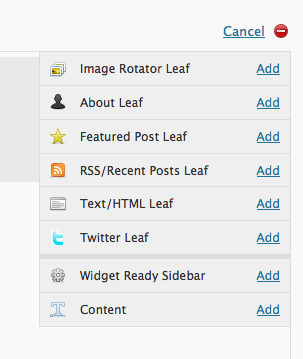
The analogy they use to describe what they do is a dining room table. Most of our dining room tables have the ability to make them bigger when you have guests. All you have to do is add a leaf or two and your table gets bigger so you can seat more people.
In the same way, Headway has a Layout Editor where you can add more page elements by adding more “leafs”. Just click the “Add a Leaf” link in the Headway Layout Editor and a menu pops up with the option to add any of 8 different kinds of leafs to you page layout.
Simply choose the one you want based on the type of content you want displayed in that page element and click the “Add” link. Headway adds that element to the page for you.
Then you can click the “edit” link on the leaf to customize the exact content within that leaf.
On each leaf you can also use your mouse to set
- Width
- Height – exact height or fluid
- Alignment – left or right
Either with a click, or simply by dragging an edge of the leaf in the layout editor.
You really need to watch the page layout demo video on the Headway site to appreciate how much they have just simplified layout design for WordPress users with this feature.
The first time I saw it my jaw dropped.
Because Headway allows you to have a completely different layout for each page of your WordPress web site if you want. All managed right in your dashboard. No more messing with php files, css and html.
Just click and drag your mouse and you’ve got a brand new layout – in seconds!
Sidebars Made Simple
Did you notice in the image above that one of the leaf options is for a widget ready sidebar? With Headway you can now add sidebars on the fly. No more need to go edit your functions.php file to get a new sidebar.
So now you can add a widgetized area to your website pretty much any size wherever you want. And you don’t need any programming skills to make it happen.
Skin Your Headway
They’ve built in the ability to add skins to customize your Headway theme. I haven’t had a chance to play with the skins yet, but the theme is set up so that you can download and install a skin for your Headway theme and have your own customized look in no time.
That’s going to be really attractive to users who want a little more customization but lack the time or ability to do the little bit of css work involved. Plus I can see a secondary Headway skin market for designers to create custom Headway skins.
Who is Headway For?
Obviously Headway makes creating custom layouts easy for people of modest technical means. WordPress beginners will love the ability to make their site look exactly the way they want without having to pay a designer to make the customized changes they want.
But I completely see how Headway will be perfect for someone like me too. Sure I can do everything that Headway does manually. But I can’t customize layouts anywhere near as quickly manually as I can with Headway.
Headway is perfect for smaller design and WordPress customizing shops, single designers, etc. because it speeds up the design and layout process so we can be more productive and more profitable. Just create a skin for your client and you are ready for delivery.
And here’s another juicy tidbit. The good folks tell me they are already working on a WordPress MU compatible version of Headway. That’s got me really excited. To be able to truly manage all my client sites in one place and give them completely completely different custom websites from within the same theme framework will make my life so much easier!
Bottom Line
Headway is a fantastic new theme. I’ve said before that it’s a game changer & I completely believe the bar for all WordPress premium theme developers has been raised a little higher with it’s release. Their price point is competitive with other premium WordPress themes out there now. Bottom line, Headway is a bargain that is sure to give the other custom themes a run for their money.



Chris-
Wow! This is one info packed post.
Thanks for the heads-up…..I’ll make this move at some point.
hmmm, is the theme good with SEO as well? by d way, It seems to be a good theme to own
Thanks for sharing the information.Really useful.
Very good article, nice piece of information, I really like it. Thank you for sharing.
Thanks for sharing. The article is very informative and clear, love the print screen also. Forwarding it to a friend who works with a lot of WP sites and RT’ing.
Vicky
Wow – thanks Chris for this review of the new Premium WordPress Headway theme.
Just, as I contemplate, a new website. Cool …. way cool.
Ain’t new technology grand? – I love it! This just made your work and all of ours – a whole lot easier – time saving and convenience all under one cover – fantastic!
Thank YOU Chris for this timely post (no accidents, right?)
Trudy
Great information here, buddy. The theme is definitely interesting!
Just started a new blog with the Headway Theme. Loving it so far!
Looking great.
I didn’t know these kind of frameworks for wordpress, looks like they’re very useful and customizables.
Will have to play for a while with this first though…
having so many wordpress themes to play with makes my webmastering life more confusing. however, whenever a nice new theme comes to my attention, i can’t help but to give it a try. nice find on this one!
This is very timely information for me. I’ve been working mostly on Typepad themes for folks and haven’t really delved deeply into customizing WordPress because of the learning curve. Your post is enough to motivate me to checkout Headway and see what I can do with WordPress.
Thanks!
Chris – this is a great review. Hits a lot of the points I was looking at when I first saw Headway…
But here is my question/concern.
So, I’m a “one-man-shop” design place….I do it part-time. So anyway – say I’m working up a new Headway-powered site for a customer. I have it on my test server, making it up, making my leafs, working with the CSS/colors/etc. And I get it so that it’s looking really hot.
With the “old way” of working with WordPress, I would just upload that Theme to their live server – hit “Activate” and I was good to go.
But now…I have to go into their live server and manually re-create everything I did on the test-server. I have to create all the leafs again, adjust all the settings to all the leafs…go through all of the design option panels and make sure I have all of the font size info the right way, etc, etc.
Isn’t that right? And doesn’t that just take MORE time?
I’m also a Thesis designer….but this Headway looks pretty sweet – but I’m not sure I’m ready to switch over…..
That’s a great question, Adam. I know it can be done. But when I rethemed SuccessCREEations here I just went back through and manually changed everything to match my development site.
It only took about 20 minutes to manually adjust the settings because I didn’t have to test how they looked. I just went through and set them all the same as the dev site.
I know there is an easier way, but I was in a hurry and didn’t take the time to work it out. I’ll ask on the Headway support forum what the fastest way to keep the settings in place when moving from a dev site to the live site.
Thanks Chris – I know there must be a way too…we’ll see. Let us know what you find out.
Any news on this feature?
Adam, Clay said he’s changing the way the data is stored for the next release of Headway to make it easier for developers to move sites like this. Right now it’s still just a little bit cumbersome like we thought.
Hey Chris,
This interests me also. I have a friend who would like to use the same set up I’m using on Headway. Is there a way to share what I created without having to re-do it on his site?
Thanks!
Heya Kris! Just sent you an email with an answer. The short version is that Headway version 1.6 (still in beta at the moment) will have an import/export feature for skins that will make transferring or copying site skins created with Headway incredibly easy.
Wow this theme looks really good, ive just started using wordpress recently and Ive always wanted more customization in the dashboard, this could definitely be what im looking for.
I am a complete rank amateur at website/blogging. I purchased the Headway theme yesterday and am regretting it. The “support” on the site does not walk you through the steps it just says here what we offer, now go to it. Which would we great if I knew what I was doing!
Bottom line — if you don’t know what you are doing with theme design Headway is not for you.
Laura, WordPress itself can be overwhelming for many rank amateurs.
The Documentation section at the Headway site goes through all the basic steps to get started right away with the theme. And their support forum has been incredibly responsive to specific questions.
I’m not sure I understand your expectations. If you could clarify them a little more, perhaps I can point you in the right direction.
That was a very informational post about the Headway theme. I have never heard of this theme before so thanks for sharing. Greg Ellison
It’s early days but the new headway theme seems to be winning fans. reviews are good and thanks a ton for this info too.
I’ve been hearing lots of good things about silverstripe but your blog on headway comes at a good time for me, before I furrow down a path I wish I hadn’t.
I’m with Chris on this, Headway just got a whole lot easier and you will save a ton of time, unless of course you were extremely handy at using codes. Most people will definitely find dragging and placing using the mouse much better. Esta mejor.
Awesome. I stopped using WordPress because as a beginner it was hard to get the layout I wanted. Looks like I now will be making some “Headway”.
Thanks for the post
I stopped using WordPress a long time ago because I found it difficult to navigate. Maybe now is the time to give it another try.
Yay, this will be a perfect theme for my food blog. Great!
Interesting that WordPress themes are starting to refer to themselves as Frameworks. It must send shivers down the spines of true Framework developers.
I’ll have to take a look at Headway, though for most of my design work I’m using ExpressionEngine at the moment.
Hi Chris,
I’m just looking for a theme with great design/layout options, easy to use, because I’m not very skilled in coding and have to adapt an onsite-blog (subfolder) to an already existing site.
Yes, simple to use options in thesis are limited, but with custom.css, custom-functions.php and hooks, you can manage almost everything. Yes, many design and layout items are easy to handle in headway (more than thesis offers), but what doing, when big options of headway are not big enough?
An example: I need a horizontal navigation, containing TWO rows, not just one (2×6 links). Additionally with CSS-dropdown. As it is an onsite blog, the links must lead to pages outside the blog (within the site).
I guess headway doesn’t make this possible just by drag and drop or clicking. How to solve such bigger things with headway?
Martin
wow…great info..i like your theme too!!
Great post! Thanks for the information.
One thing I like about my current theme is the ability to change the “Navigation tab hover color” from within the theme’s control panel. Can this be done with Headway (again, from within the theme’s control panel) or does it need to be coded by hand?
Thanks.
I love the idea of drug and drop, it just gives much more time to concentrate on other things that are so much more important to me; like article production.
I never outsource my articles as I like to take time and put the effort myself and the last thing I want to be involved in is designing my website! Lets say kindly that I am not much of a use at that.
Thank you ever so much for bringing this idea to my screen, I will sure have a look further into it.
Sincerely,
Kazooli
it looks promissing with many options and easy to customize leafs!
I purchased Headway, but the layout editor won’t work on my local site run on an xampp server. Which makes it useless, since I can’t design locally. I worked with support on this and they finally gave up and said they would fix the problem in the next release. Just wondering if anyone else has had this issue, or has any ideas about a fix.
Thanks,
Dennis
Dennis, I develop all my sites on a test domain that gets no traffic. Also you can do your development on a subdomain.
I’m currently building a client site on a subdomain that is password protected and has the search engines blocked in the htaccess file. The only ones who can see the site are me & the client.
I don’t develop any wordpress sites locally. I just use a good text editor and FTP. Piece of cake.
Thanks for this nice review, you’ve help me make a decision.
I’ve got a new launch coming up and don’t want to spend days on end, fudging around with the layout. My goal is to get a decent look and then concentrate on content.
Headway seems to better fit the bill than my previous selection.
Excellent article on wordpress we are newbies but learning more daily!
I stopped using WordPress a long time ago because I found it difficult to navigate. Maybe now is the time to give it another try.
I’m actually taking a class that requires us to use the wordpress blog system and I’ve found the new additions to be really unique and easy to use.
With so much talk on wordpress lately, I am thinking of using it and this just confirms that wordpress really is good.
I just have this Headway theme! The panel has a lot of functions as I see. Still learning to customize everything I need for the total renovation of my blog.
This is very timely information for me. I’ve been working mostly on Typepad themes for folks and haven’t really delved deeply into customizing WordPress because of the learning curve. Your post is enough to motivate me to checkout Headway and see what I can do with WordPress.
Thanks!
Why should we listen to you? Just look at this blog. Its truly one of the best I have seen. I love the theme. And how everything is structured, It really very good. Kudos
That has got to be the coolest theme I have ever seen. I have been looking forever for a tool that’ll let me layout a wordpress blog like that.
I’ve been using Flexibility Theme which is highly customizable and very easy to use, but I wouldn’t mind a bit more flexibility with the layout. How much more difficult is the Headway theme to learn and use than the Flexibility theme?
thanks for the post
Hi there! Wow! It’s really very nice post. I enjoyed reading it. I love to read this type of posts. It is very interesting and informative. By the way, thanks for sharing such a nice article. Keep on posting such a great article. Best regards for ahead.
I’ve been following your blogs for a while now and this is honestly one of the best I’ve read. Its a simple and organised blog. Thank you for sharing this with us.
Thanks for highlighting this one. Great time saver.
I really like the theme but I prefer to stick with free ones
If you arent using wordpress on your site you are missing out to reaching several million viewers for sure.
Thank you! it’s time to upgrade my wordpress =)
Thank you for this awesome review. You’ve just solidified my decision to buy this theme. =)
Thank you for this info, it´s very useful for me and my bussines
I´ll try it in my wordpress blogs
Thanks for this info. Very informative and useful information!
I’ve been using Thesis theme for a while now; like it a lot so far. But maybe it’s time to try out something new. Next blog?
Thanks for the indepth review.
Useful information, thanks. Headway and Thesis both were talking about versions 1.5 and 2.0 respecively for September, but nothing’s happened. Any news?
I do know that Headway 1.5 is in beta right now. I’ve seen it, used it on a test domain, and it is nothing short of amazing.
i love the fact that all the css is done, and by just opening the styles. file you can see all the hard work, and usage of the css, great stuff
Thank you very much for this review of the new Premium WordPress Headway theme!
Chris, nice review. How would you compare it to Builder from iThemes and to Thesis. Or better yet how would you rate/rank/compare the three of them?
How Do you move everything from a current WP site to Headway? Is it automatic?
Dian, To recreate an existing design in Headway you have to create it manually. The good news is much of the design can be done with Headway’s visual editor greatly speeding up the process. There are some things such as background images that, if your theme uses them, you will have to set up with custom.css.
I’ve found Headway’s visual editor gets me most of the way there very quickly. Then I only need a little custom CSS for those finishing touches.
Thank you for the informative post. I was searching for something relevant and found your site in the process.. I will definitely be back again for more.
Thank you very much for this review of the new Premium WordPress Headway theme!
This post is really well written because it gave all the details and information on the subject.
Thanks for the Headway review. I’m torn between Headway and Thesis – it seems like Headway might be easier for a non-programmer to use. Have you had any experience with Thesis, and if so, how does Headway compare?
Nathan, I’ve used both Thesis and Headway on numerous projects. Both are high end and very capable themes. In my opinion it is far easier for most people to create a much wider variety of looks and layouts faster with Headway than with Thesis.
Thesis is a great theme. But in my opinion they oversell the ease of customization, especially for new people with less programming skills.
I’m considering Headway (largely because of your review and the fact that I have a design in mind, but not enough knowledge of CSS to pull it off), but I’m not sure how this type of environment works with an e-commerce plug-in, such as Shoppe. Are the special product pages (and templates) incorporated into the Visual Editor interface, or must you work with the Shoppe features via the dashboard only?
Headway, clearly not all that, once you pay for the Headways theme and get your account details, then you get hit with extra hidden option fees, , not clear on the sales pitch at all. When you contact sales, the give you a BS story, after trying the Headway for 10 days its clear its not really drop and drag ,nor easy to build a website as advertised. When you ask for a refund , they state no refund.
This is not sour grapes, this is junk at best and a total waste of money.
DO NOT WASTE YOUR MONEY
I have been searching for this quality blogs regarding this niche. Searching in Yahoo drove me here, I just found this kind of satisfactory readings i was looking for. I must bookmark this website to avoid missing it again….
I know this post is a bit dated, so I’m curious. Would you still recommend Headway as the best way to go? From your footer it looks like you don’t use it yourself anymore. Would love to get your feedback.
Heya Elizabeth! I don’t think there is one “best way to go” in all situations.
Headway is a great choice for folks who want to be able to customize much of their site without having to get into coding any php, css, etc. That said, I’ve encountered several folks, especially those on the lower end of the technical skill scale, who find the array of controls and options Headway includes to be overwhelming. These folks may buy Headway thinking it will be easy when in truth it is easier (in many respects) to customize than other theme frameworks.
That said our business here at SuccessCREEations is to the point where we work almost exclusively with Genesis these days. From a developer’s perspective I find it easier to make Genesis look exactly the way my client wants it. Plus they have a ton of great child themes to choose from for those who don’t want to mess with the coding.
For me and my business I find Genesis simpler/faster/better to work with than Headway. But Headway is still a fantastic option for many other folks in different situations.