

• WordPress
    • Why WordPress
    • WordPress Support
    • WordPress Websites
    • WordPress Web Hosting
  • Our Projects
    • WPAnnex
    • EmmanuelPress
    • ChrisCree.TV
    • New Media Profit Path
  • Get Your Domain

SuccessCREEations, Inc.

Guiding Your Business to Increased Income though Effective New Media Systems Online

  • Home
  • About
    • Talk About Us
    • Chris Cree
    • Examples of our Work
      • Dr. Mo – Learn to Win!
      • Allstate Insurance
      • Halo Models & Talent Group
      • HighCallingBlogs.com
      • MyHuntingandFishing.com
      • BuzzFoto
  • Services
    • Social Media
    • Websites
      • WordPress Support
      • WordPress Web Hosting
      • Domain Names
  • Blog
    • Archives
    • Site Map
    • Comment Policy
    • Tag Cloud
  • Contact
  • Topics
    • Blogging
    • Social Media
    • WordPress
      • Tips
      • Themes
      • Plugins
    • SEO
    • Tech Tips
    • Personal Growth
    • Misc
You are here: Home / WordPress / Tips / Older Versions of WordPress Hacked

Older Versions of WordPress Hacked

July 2, 2008 by Chris 14 Comments
Tweet

WordPress blogs are starting to get hacked in greater numbers lately. The problem is getting serious enough that the WordPress podcast recently addressed out of date WordPress blogs being hacked.

Even my good friend Mark Goodyear went to log into his blog and discovered that GoodWordEditing was hacked. In his case he couldn’t even log into the blog’s dashboard anymore.

Old WordPress Versions Vulnerable to Hacking

In Mark’s case, as is the case in the overwhelming majority (if not all) of cases, not keeping his WordPress installation current exposed his blog to hackers. In Mark’s case the hackers were going after his passwords.

The trend seems to be the hackers gain access via out of date blogs and insert some password snagging software. Then when the blogger realizes there’s a problem and finally get around to upgrading their WordPress the hackers can come back at their leisure and do whatever they want with the blog. If the blog owner doesn’t change his passwords, that is.

Mark changed his. All of them.

Fortunately for Mark I was able to recover his blog, find and remove the malicious code that the hackers added to his blog. We got him up and running normally over the weekend. He’s now secure and good to go.

Bad to Worse
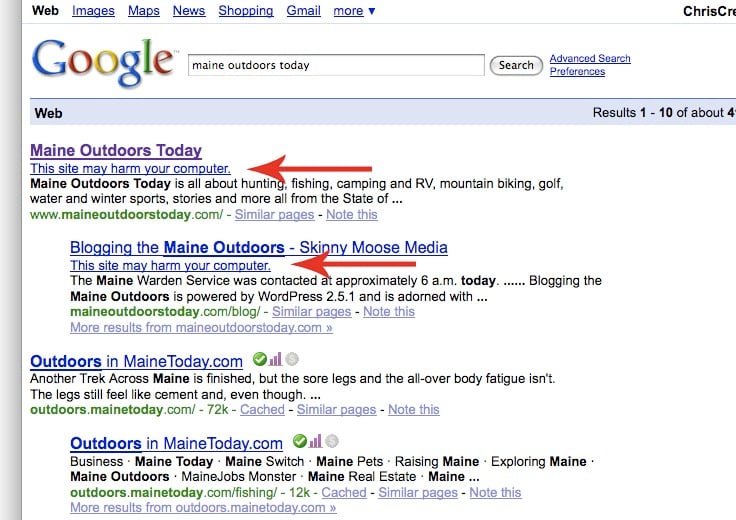
Hacked Google ListingIf left unchecked hackers can put code on your site that will create problems for you with the search engines. As an example Skinny Moose Media has a blog called Main Outdoors Today that will show us what can happen.

If you Google “Maine Outdoors Today” you will get the results shown over on the right here.

Right underneath the page title in the listing is a notice that says “This site may harm your computer.”

If you happen to be a gutsy type and clicked through the listing anyway, recklessly unconcerned of the potential dangers to your computer, Google would direct you to the a page that looks like the image below.

Google Malware MessageHow do you think a message like that will affect your search engine traffic?

Trust me, it’s not good.

Now it so happens that Maine Outdoors Today is NOT on WordPress. Please don’t think I’m trashing on them. Steve Remington over there is a friend of mine.

Nor am I saying that WordPress is a bad or insecure platform, in spite of the negative spin their competitors are trying to put on this issue.

The good news is that WordPress is a very secure platform if you take some reasonable (and relatively simple) precautions.

Update Regularly

The single biggest thing you can do to protect your WordPress blog from hackers it to update it regularly. In Mark’s case he was running a very old version. In fact I’m not sure it had been updated since the site was first set up.

Over time exploits are discovered on old versions of most any software. Think about all the security updates that Windows has users download over time.

WordPress is no different. Update it when new versions come out and you will greatly reduce your exposure to hackers.

The same goes for your plugins. One angle that hackers use is coming into the blog via old (or poorly written) plugins. In the overwhelming majority of cases security breaches in plugins are patched very quickly so keeping your plugins up to date is a must.

WordPress Support by SuccessCREEations

If updating your WordPress installation is more technical than you want to take on by yourself then I’ve got some good news for you. We are now offering WordPress support to help folks keep their blogs secure.

So whether your blog has already been hacked or better yet before you get hacked, we can help you.

Check out our other social media services as well. And be sure to take a look at what people are saying about us while you’re at it.

Related Posts with Thumbnails
Print Friendly

SuccessCREEations.com runs on the Genesis Framework

Genesis Framework

The Genesis Framework empowers you to quickly and easily build incredible websites with WordPress. Whether you're a novice or advanced developer, Genesis provides the secure and search-engine-optimized foundation that takes WordPress to places you never thought it could go. It's that simple - start using Genesis now!

Check out these incredible features and wide selection of designs. With automatic theme updates and world-class support included, Genesis is the smart choice for your WordPress website or blog.

Or even Become a StudioPress Affiliate yourself.

Filed Under: Tips Tagged With: Hacked, WordPress, WordPress Blog Hacked, WordPress Support

Comments

  1. Mark Goodyear says:
    July 2, 2008 at 2:35 pm

    Thanks again, Chris!

    Reply
  2. real live preacher says:
    July 2, 2008 at 3:18 pm

    Wow, I had no idea. That goodness I use Drupal and have a tech guy in Australia to run things. What versions of WordPress are safe? I have a number of wordpress sites that I have setup for various things.

    Reply
  3. Chris says:
    July 2, 2008 at 3:59 pm

    Mark, No worries. :)

    Real, The general rule is the most current is most secure. It’s possible that a particular blog may never be targeted by hackers even though it’s running out of date software.

    The question to ask is, am I willing to loose my blog? If not, then upgrading is probably in order.

    Back up early! Back up often!

    Reply
  4. Airsoft Rifles says:
    July 5, 2008 at 8:13 am

    I tried to go to that Maine Outdoors site, and not only did Google block it, but my own browser blocked it; it was actually somewhat difficult to finally get in. Most people wouldn’t go as far as me, however, so the traffic for that site is probably destroyed. Damn hackers, they are too malicious!

    Reply
  5. Chris says:
    July 5, 2008 at 8:54 am

    Airsoft, Yeah it’s a real problem. I just had a conversation with another friend this AM who had 2 blogs hacked with malicious code inserted.

    Keep those WordPress blogs updated!!!

    Reply
  6. Justin says:
    July 5, 2008 at 10:12 pm

    I hear you! Too many people just setup their blog and do not bother with the updates. WordPress even shows you if you’re not using the latest version. I think many blogs were installed by some control panel app and until that app is updated non-technical folks do not know how to properly upgrade their site.

    Reply
  7. Chris says:
    July 6, 2008 at 7:00 am

    Justin, WordPress telling folks their versions are out of date is a relatively recent thing. There are still a ton of installations out there that are old enough they don’t do that for them yet.

    Even though the one-click upgrades such as with Fantastico are much easier, it is still possible for folks to really mess things up with them.

    Reply
  8. Marius says:
    July 16, 2008 at 4:09 am

    And many people are not updating WordPress because they don’t know if the theme they use will work or not with the new version. I know this is a huge problem for me, especially if is a custom theme I paid for.

    Reply
  9. Hunter says:
    July 16, 2008 at 7:53 pm

    Time to update your wordpress! It’s just good practice to stay on the latest version.

    Reply
  10. RaiulBaztepo says:
    March 28, 2009 at 5:42 pm

    Hello!
    Very Interesting post! Thank you for such interesting resource!
    PS: Sorry for my bad english, I’v just started to learn this language ;)
    See you!
    Your, Raiul Baztepo

    Reply
  11. El Nino says:
    April 15, 2009 at 2:23 pm

    Hmm.. nice article and my friend had same problem as Maine Outdoors Today.
    Just google “eobandung” and its look similar case with Maine Outdoors. Now he was looking for inserted dangerous code that was “frame” or “iframe”.

    I got alert like this when trying to open his site:
    s5.tinypic[dot]com/1607ouh.jpg

    Reply

Trackbacks

  1. Improved Security When Upgrading WordPress Not Automatic | SuccessCREEations, Inc. says:
    August 27, 2008 at 10:46 am

    [...] your WordPress blog was hacked, say, because it hadn’t been updated in a while you are going to want to take some extra [...]

    Reply
  2. WordPress Security Release Version 2.6.5 | SuccessCREEations, Inc. says:
    November 26, 2008 at 10:29 am

    [...] I’ve said before, like any software older versions of WordPress are vulnerable to hacking. Keeping your WordPress blog version current is a critical step to keeping your site secure from [...]

    Reply
  3. Infographic Shows WordPress Top Open Source CMS | SuccessCREEations, Inc. says:
    December 8, 2010 at 7:10 am

    [...] using older versions of WordPress. It is especially surprising because it is really old news that older versions of WordPress get hacked and one of the biggest things you can do to protect your site is keep your software up to date. [...]

    Reply

Comment Policy: Your words are your own, so be nice and helpful if you can. Please, only use your real name and limit the number of links submitted in your comment. If in doubt, please take a moment to review our full Comment Policy before you click "Post Comment" so we don't mark your comment as spam.

Speak Your Mind Cancel reply

*

*

Sponsors

Gravity Forms Plugin for WordPresssocialoomphScribe SEO

Connect with Chris

  • Facebook
  • Google+
  • Linkedin
  • RSS
  • StumbleUpon
  • Twitter

ChrisCree.TV

ChrisCree.TV banner

High Calling Blogs

Work and God

Good Stuff

Local Guides

  • Austin
  • Memphis
  • Charlotte
  • Baltimore
  • El Paso
  • Milwaukee
  • Madison
  • Boston
  • Seattle
  • Nashville
  • Denver
  • Washington DC
  • Las Vegas
  • Louisville
  • Portland


 TwitterCounter for @ChrisCree 
Friend of Creative Coast Button
Blog Network:
Name:
SuccessCREEations
Topics:
Social Media, Blogging, WordPress
Join my network
Blog Networks

Did you notice how fast this site is?

SuccessCREEations is accelerated by the
MaxCDN Content Delivery Network

Return to top of page

Copyright © 2012 · Delicious Theme (heavily) customized by SuccessCREEations, Inc. on the Genesis Theme Framework · WordPress · Log in